New - Just Now
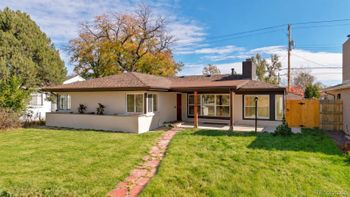
$985,000
Active
5
Beds
3
Baths
3324
Sqft
0.18
Acres
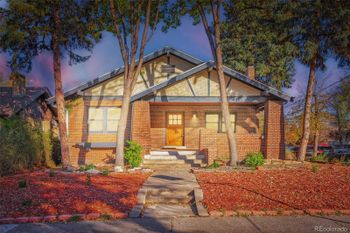
3050 N Monaco Street Pw, Denver, CO 80207
MLS#: 8903917
.jpg)


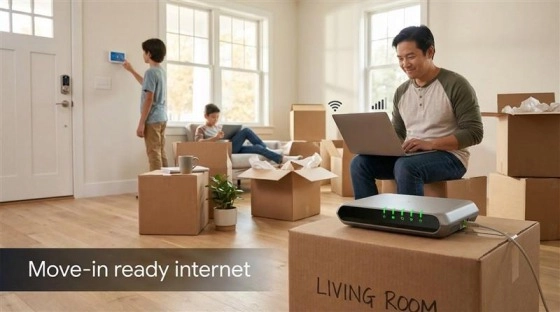
Confirm internet service before you close, not after the moving truck arrives. Colorado's fastest-growing suburbs sometimes outpace the fiber build-out, and new construction that advertises "fiber-ready" can mean nothing more than an empty conduit in the wall until a provider actually lights the line. Here's how to lock in service before your Colorado move-in day.
Run three checks before you write an offer. First, ask the seller, the listing agent, and a neighbor what provider they use and whether service holds up during peak evening hours. Second, plug the exact street address into each major provider's availability tool rather than trusting a general coverage map, since those maps frequently miss gaps down to the house number. Third, if the home is new construction, ask the builder directly whether a provider has already run fiber to the lot or only left conduit in place.
Comcast Xfinity covers most of the Front Range on cable and expanding fiber. CenturyLink, now largely rebranded Quantum Fiber, runs fiber in parts of Denver, Aurora, and several suburbs. Google Fiber serves a growing set of Denver-area neighborhoods. T-Mobile and Verizon 5G home internet reach many addresses without a wired install, and Starlink covers mountain and rural properties where no wired provider reaches.
Not evenly. Established Denver neighborhoods and newer subdivisions built in the past five to eight years have the best odds of a fiber option, while older rural county roads and some mountain communities still rely on fixed wireless or satellite. Confirm the exact address, not just the city, since fiber build-out runs block by block.
Fiber sends data through glass strands and delivers matching, symmetrical upload and download speeds above 1 Gbps. Cable runs on the same coax line as your TV service, with fast downloads but uploads that top out around 25 to 35 Mbps. Fixed-wireless 5G pulls a signal from a nearby cell tower, which works well where no wired line reaches the address but varies with signal strength and network load. Order fiber where it's available, cable where fiber stops short, and 5G or satellite only where nothing wired reaches the property.
Call the provider the day your offer is accepted, not the week you move. Most wired installs require a technician visit to run the line from the street and mount equipment, and that appointment slides further out the longer you wait. Treat the internet call like the inspection or the appraisal: a closing-checklist task with its own deadline, alongside your Colorado mortgage pre-approval and moving company booking.
Ask specifically whether a provider has pulled fiber to the lot or only installed conduit; "fiber-ready" on a builder's spec sheet can mean either one. If only conduit is in place, loop the builder into your call with the provider so the fiber gets pulled before drywall closes up the walls, which avoids a saw-cut driveway or wall repair later.
A single remote worker on video calls is comfortable on 100 to 300 Mbps download with steady upload speeds above 25 Mbps; a household with multiple remote workers, streaming, and smart-home devices runs better on a gig-tier plan. Focus on the upload number and the latency figure, not just the advertised download speed, since those two numbers matter most for video calls and cloud backups. See the Colorado home financing guide if you're also budgeting your monthly housing costs alongside a new internet plan.
Ask about data caps, equipment rental fees, and activation charges before you sign, and get the answer in writing. A modem or gateway rental fee alone can add $10 to $15 a month if you don't supply your own compatible equipment.
Call the provider forty-eight hours before closing to confirm the account has switched to your name and the activation status shows active, not pending. Pack the modem or gateway in your personal essentials bag rather than the moving truck, and run a speed test from a phone near the router as soon as the lights turn solid, then again from the far side of the house to check whether you'll need a mesh extender.
Cable through Comcast Xfinity remains a strong fallback across nearly the entire Front Range, and newer DOCSIS plans have narrowed the speed gap with fiber for most households. National providers structure some fiber plans without an annual contract and with symmetrical speeds; see this residential fiber internet services plan as one example of what those no-contract, symmetrical-speed terms include when you're comparing offers.
Yes, though the options differ from the metro area. Starlink satellite service covers most mountain addresses where no wired provider reaches, and fixed-wireless from a regional provider sometimes fills the gap in foothill communities. Confirm actual speeds with current residents rather than relying on a coverage map alone, since mountain terrain can block a wireless signal that shows as "available" online.
Ask which provider they use, what speed tier, and whether service has been reliable during storms or peak evening hours. A shrug or a vague answer is worth following up with a neighbor before you assume the home has a solid connection.
A straightforward install on an existing line books within one to two weeks of your call in most cases. New construction or a home needing a fresh drop from the street can take four to eight weeks depending on the provider's crew schedule, which is exactly why the call needs to happen the day your offer is accepted. Allconnect's home-buyer checklist walks through the full call script if you want a script to work from.
Colorado's hail season, running spring through September, and heavy winter snow events both put outside lines at risk, whether it's a downed cable line after a wind storm or a fiber cabinet knocked out during a hailstorm. Keep a backup option ready during those months: a charged phone hotspot or a prepaid 5G puck covers a few days while a provider's field crew catches up on repairs after a widespread outage.
The Kenna Group helps Colorado buyers coordinate closing timelines with utility and internet setup so move-in day goes smoothly from the first box to the first video call. Call or text 303-955-4220. A live person answers. Not a robot, not a phone tree. Start by browsing to search every home for sale in Colorado.
Questions about any home in Colorado? Call or text 303-955-4220. A live person answers.
Before you write an offer. Plug the exact street address into each provider's availability tool rather than a general coverage map, since gaps frequently show up down to the house number.
Comcast Xfinity, CenturyLink/Quantum Fiber, and Google Fiber in select neighborhoods, plus T-Mobile and Verizon 5G home internet and Starlink for rural and mountain addresses.
It can mean the fiber line is live, or it can mean only an empty conduit is in the wall. Ask the builder directly which one applies before you count on day-one service.
100 to 300 Mbps download with steady upload above 25 Mbps for one remote worker; a gig-tier plan works better for multiple remote workers or a smart-home-heavy household.
Confirm the account and activation status forty-eight hours before closing, pack the modem in your essentials bag, and run a speed test as soon as the equipment lights up.
Yes, through Starlink satellite service or regional fixed-wireless providers in most areas, though actual speeds are worth confirming with current residents rather than a coverage map alone.