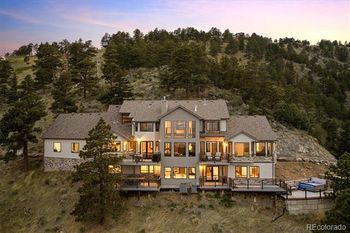
Looking at Blue Mountain Estates in Golden? 4 homes are for sale right now, $949K to $2.79M, median $1.57M, all of them below and updated daily. No HOA on the listings this week. Call or text 303-955-4220. A live person answers.
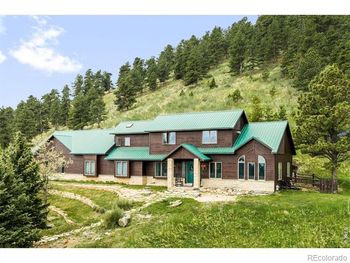



Blue Mountain Estates is a foothill-area label, so buyers should confirm the exact subdivision, access road, and county records. Start with nearby cues such as Golden Gate Canyon Road, Highway 93, and North Table Mountain, then confirm city, county, and subdivision records by address.
Homes may differ widely by lot slope, driveway grade, utility setup, outbuildings, and distance to paved routes. Compare the listing remarks, floor plan, tax record, and HOA or condo documents before assuming the property type.
Check HOA or road association documents, private road maintenance, wildfire mitigation rules, and any well or septic records. If there is a metro district, condo association, road association, or special district, verify taxes and duties before offering.
Compare routes to Highway 93, Golden Gate Canyon Road, downtown Golden, and I-70 before assuming an easy commute. A short map distance can feel different when a route uses collector roads, steep streets, or busy arterials.
Look closely at drainage, retaining walls, roof age, defensible space, snow storage, and insurance requirements. Use inspection reports, seller disclosures, county records, and HOA documents to confirm what applies to that property.
Use the exact address to verify school boundaries for Blue Mountain Estates. Use the exact address to confirm Jefferson County school boundaries and any mountain or foothill transportation details.
Financing and insurance can change with property type, age, HOA rules, metro district taxes, and inspection findings. Confirm the exact Blue Mountain Estates address with the lender and insurer before deadlines.
Before touring Blue Mountain Estates, compare layout, lot shape, garage, condition, HOA rules, and street position. Use documents and disclosures to separate a strong fit from a weak one.
6 homes are listed in Blue Mountain Estates right now, from $418,000 to $2,790,000 with a median of $1,199,500. Listed homes run 3 to 6 bedrooms and 2,599 to 6,622 square feet. The listings show no HOA fee; confirm with the title company, because some associations bill annually. The average listing has been on the market 143 days. 1 of them is already under contract. ZIP code 80403.
For sale now
6
Blue Mountain Estates, Golden
Median price
$1,199,500
$418,000 to $2,790,000
Size
2,599 to 6,622
square feet
HOA
None listed
confirm with title
6 homes are listed in Blue Mountain Estates right now, updated daily on this page. Golden has 319 homes for sale across all its communities.
Listed homes in Blue Mountain Estates run from $418,000 to $2,790,000, with a median asking price of $1,199,500.
The homes listed in Blue Mountain Estates right now show no HOA fee. Confirm with the title company before closing, because some associations bill annually.
Call or text 303-955-4220. A live person answers. Not a robot, not a phone tree. Showings the same day when the seller allows it, and the HOA documents pulled before you go.
Call or text 303-955-4220 All Golden homesThe six closest subdivisions with a home listed right now, nearest first. Each link opens that community's live listings with prices, sizes and HOA.